
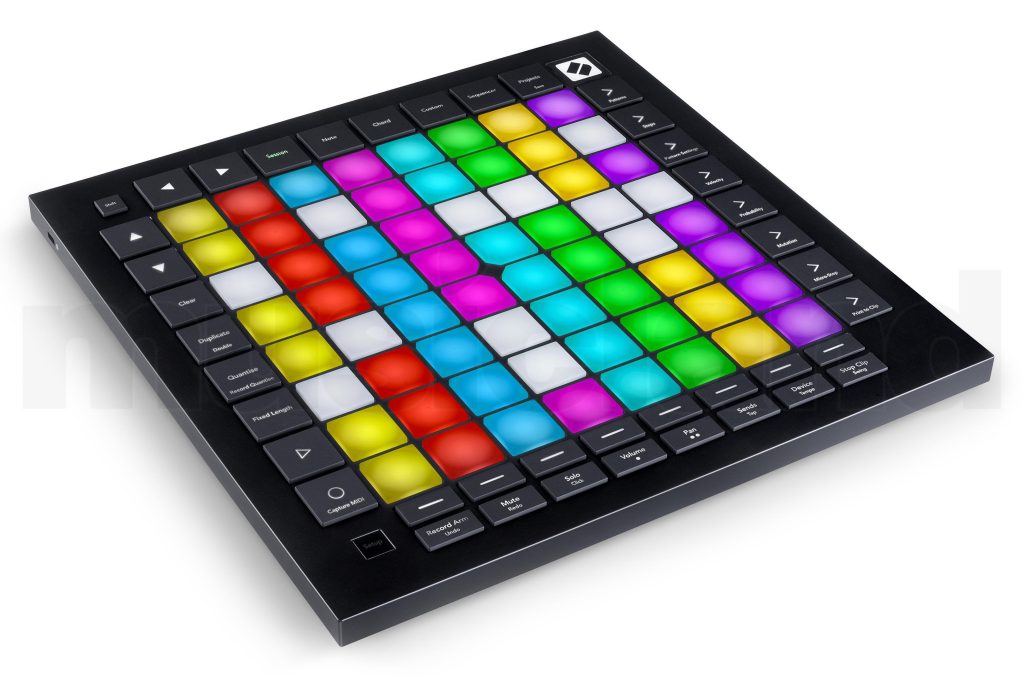
Novation Launchpad Pro MK3 Grid Controller
- For Ableton Live as well as other music software and external hardware / Ableton Live Lite licenca ukljucena
- 64 Touch- and pressure-sensitive RGB pads
- 4-Track sequencer with 32 steps
- Chord mode
- Dynamic note and scale modes
- 8 User-defined modes with Components Editor
- Transport control
- Tap pace
- Print To Clip and Capture MIDI mode
- USB-C port
- MIDI input
- MIDI output
- MIDI Thru / Out 2: 3.5 mm mini jack
- Dimensions (W x H x D): 268 x 18 x 268 mm
- Weight: 1 kg

The complete sequencing workstation
The Easiest Way to Take Full Control of Ableton.
Launchpad Pro Mk3 is the simplest and best way to create dynamic, expressive performances in Ableton Live, or any music software.
We’ve given our iconic Launchpad a total overhaul. Enhanced with RGB LED feedback, and velocity and pressure-sensitive pads, Launchpad Pro brings limitless expression and creativity to your music.
Launchpad Pro

It’s An Instrument – Play It!
Launchpad Pro is an instrument designed for live performance. The new RGB pads light up to match the colour of your clips in Ableton Live’s session view, so you can see at a glance which clips are playing.
RGB Pads in Ableton
In Note Mode, it automatically switches the layout for drum or instrument devices:
Launchpad Pro Drums

Drums: all your sounds spread across the whole grid, on velocity and pressure-sensitive pads which let you create expressive beats.
Beat maker?
Launchpad Pro Instruments

Instruments: the grid illuminates as a chromatic keyboard, so you can easily play notes, melodies and chords.
Play Just About Anything
You can use the grid to play any of your music software and external hardware too – with Standalone Mode. It doesn’t matter which software you are using: plug it straight into Logic Pro, for example, and play it like a keyboard; connect the MIDI ports to your Bass Station II and play riffs on your grid. The possibilities are endless.
Launchpad Pro MIDI Ports

Synth user?
Stay in Your Flow
Launchpad Pro is much more than an instrument: it also gives you slick, immediate access to all your mixer controls mid-performance, so you stay in your flow. There?s no need to enter a separate mixer mode; simply press and hold a mixer function button (like mute or volume), make a change, and then release the button to drop straight back into your performance.
Launchpad Pro Buttons

Scale Mode
Press the Note and Shift buttons to switch Launchpad Pro to Scale Mode. The pads automatically assign themselves to the notes of one of 32 keys and modes, making it impossible to play out of key. Seven Overlap options enable the relative positioning of notes on each row to be offset, while Chromatic 4th Mode keeps the pads assigned to the chromatic series but highlights the notes of the selected scale or mode within it.

Stay in Control of Everything
Control your effects, instrument devices and plug-ins mid-performance to add engaging, expressive effects. For super smooth effect transitions, the button grid also turns into eight velocity-sensitive vertical faders, with LED feedback – the harder you hit the pad, the faster the transition.
Ableton user?
Ableton Instrument

Launchpad Pro Ableton

Plug In and Get Started
Launchpad Pro is just as sleek, lightweight and tough as the rest of our Launch range and can be chained to multiple other Launch products, or connected to the rest of your studio or live setup.
It comes with everything you need to get started, including cables and software, and can be bus-powered over USB. It?s also class compliant and doesn’t need any drivers; just install the software, plug in and start performing.
Enhance Your Performance
Take hands-on control of your music with seamless Ableton Live integration.
Launchpad Controller

Control Just About Anything
Use the grid to control any music software and external hardware.
Ableton Clips

Focus On Your Music
RGB pads match the colour of your clips in Ableton Live’s session view
Velocity Sensitive Pads

Make Dynamic Beats
Create expressive drum performances using velocity-sensitive pads.
Launchpad Instrument

Play It Like An Instrument
Easily play notes, melodies and chords on a chromatic keyboard layout.
Ableton Mix

Mix Without Losing Focus
Get slick immediate access to all your mixer controls mid-performance.
Effects plug-ins

Easily Apply Effects
Get creative by controlling effects, instrument devices and plug-ins mid-performance.
Max for Live

Build Your Own Creations
Download and control a growing library of Max for Live devices.
Launchpad bag

Take It Anywhere
Compact, lightweight and bus-powered, tough enough to survive the roughest gigs.
Launchpad included Software

Make Music Immediately
Comes with everything you need to start performing your music.
Launchpad Connections


Recenzije
Još nema recenzija.