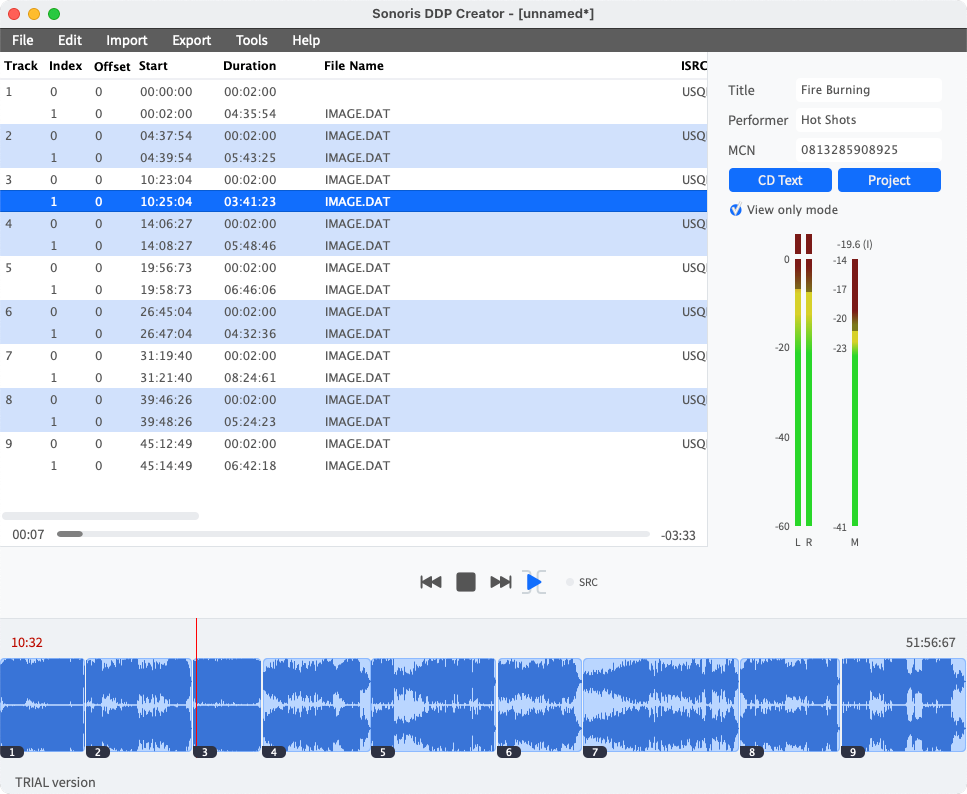
The Sonoris DDP Creator is a versatile, user-friendly application for creating high-quality audio masters, compatible with nearly any DAW. Whether you’re assembling professional Red Book-compliant CDs or vinyl masters, you can easily import and export DDP 2.00 images and Cue Sheet (cue) files, burn and rip CDs, and even upload and share your masters in the cloud.
CD authoring
With the DDP Creator you can assemble a RedBook compatible CD by just dropping mastered 16 bit wav or aif files on the workspace and set the track order. After that you can adjust the spaces between tracks and audition this by playing back the transition from one track into another. Then edit the PQ points, ISRC, MCN and CD-Text data. Finally export to DDP, Cue Sheet or CD and print a PQ sheet if needed.
Enhanced CD
The Pro option allows even more control and adds Enhanced CD support to the DDP Creator. You can create Enhanced CD DDP filesets from within the program by adding an ISO file to an audio project. This can be an (Hybrid) ISO file made with for example Toast or an ISO file made with the DDP Creator by converting a folder holding the data files.
DDP export
With the DDP Creator you can assemble a RedBook compatible CD by just dropping mastered 16 bit wav or aif files on the workspace and set the track order. After that you can adjust the spaces between tracks and audition this by playing back the transition from one track into another. Then edit the PQ points, ISRC, MCN and CD-Text data. Finally export to DDP, Cue Sheet or CD and print a PQ sheet if needed.
DDP import
Besides DDP export the DDP Creator can import (loadback) a DDP fileset too, including DDP images made by other software, like Bias Peak Studio (XT), Sonic Studio HD, SADiE, Sequoia or Pyramix. This feature allows you to check the project including all PQ codes, ISRC, MCN and CD-Text data. You can edit the project, playback tracks and export to DDP, Cue Sheet or burn a Redbook compatible CD from it.
Compatibility
Most DDP software packages or add-ons are very expensive, but the DDP Creator is competitively priced. Together with the powerful import features it is the perfect choice for everyone who needs a professional CD authoring and DDP solution without the need to switch to another DAW software. For example, you have assembled a CD in your favorite audio editor but need to deliver a DDP fileset? Simply add audio files or use one of the powerful import features like .cue Cue Sheet files from Wavelab, CD Architect .wav image files or Pyramix .pmi files or rip a CD and then export the project to DDP.
Enhanced CD
Besides audio data a CD can also hold computer data like images, videos, songtexts or even program files. A CD with such additional data is called an Enhanced CD (a.k.a. CD Extra or CD Plus). It is possible to add data in the space before the first track or as a separate data session on the CD. The DDP Creator supports the extra session as this is the most common and compatible format. When an Enhanced CD is played back in a normal CD player it will
play just like any other audio CD. But when this CD is opened on a Windows PC or Mac it will show the data session as an extra drive.
The Pro version will unlock full Enhanced CD DDP support. With this option you can open and export Enhanced CD DDP files and CD’s. Adding a data session to an existing DDP fileset is also possible.
Vinyl
A very convenient feature of the Pro version is vinyl mastering mode. This mode is active as soon as you choose one of the tracks as start of side B of your vinyl project. This effectively splits the project in a side A and B. A stereo phase correlation meter will appear and you can use it to prevent any problems in the cutting stage. Exporting the project will result in 2 audio files, 1 for each side, in 16, 24 or 32 bits wav, aif or flac. format. Generate a pdf tracklist to send with the master files to the cutting plant. Adding a side C and D takes the vinyl functionality even further enabling the export of a double album.
Never clip again
Encoding audio to .mp3 or .m4a (AAC) can introduce clipping even if the source audio is free from clipping. To prevent this you have to attenuate the source audio. But how much attenuation is needed? This is where No Clip Technology will help. It will encode and on-the-fly decode and analyse the decoded audio. It then adjusts the pre-encoder attenuation by the correct amount to prevent clipping.
iOS app
An iOS version of the DDP Player is included. The installation is simple, just download the free DDP Player app in the Apple App Store and use your serial number to unlock it. The DDP Player for iOS supports DropBox for easy DDP file import.
Dropbox Support
Export your master and upload directly to Dropbox, Google Drive, Amazon S3 or Microsoft OneDrive. Save space by zipping files before uploading and share projects seamlessly with your clients. Make your workflow smoother and more efficient!
requirements:
mac:
cpu: Intel Core i3 (or Apple Silicon M1 with Rosetta 2) or better
ram: 4
disk: 1
version: Mac OSX 10.11 or higher
internet required: no
support:
64_bit
plugins:
STAND-ALONE
windows:
cpu: Intel Core i3 (or equivalent) or better
ram: 4
disk: 1
version: Windows 7 or higher
internet required: no
support:
64_bit
plugins:
STAND-ALONE
trial: no
notes:
feature: Supports import and export of .wav, aif, .flac and .m3u files
MP3 and AAC encoding, up to 320 kbps
24 and 32 bit file support
Sample rates from 44.1 KHz to 96 KHz supported
High quality sample rate conversion (with Secret Rabbit Code)
Re-ordering of tracks
Add and edit ISRC, MCN and CD Text
Add and edit track indices, including on the fly during playback
Playback of individual tracks or entire project
Adjust and playback transitions between tracks with pre-roll
Export DDP 2.00 image files
Import DDP 1.0x and 2.00 image files
Cue Sheet (cue) support
Undo and redo
Pyramix .pmi CD image support
CD Architect .cda CD image support
CD Text binary file import and export
Audio CD burning
Audio CD import (ripping)
Data CD/DVD burning
MD5 checksum files automatically created
MD5 checking
MD5 checker executable for Windows and Mac included in DDP image
Red Book compliance checking
PQ Sheet .pdf export with additional project fields
Safe FTP uploading of DDP images
Waveform display with zooming
Edit functionality, moving and trimming of wave objects
Replace source audio file (in case of a revision)
Reading ISRC codes embedded in .wav file following the MPG / EBU standard
Peak meters
Edit functionality, moving and trimming of wave objects
Automatic Updates
Easy Online License Activation
USB drive based license activation for offline computers
Universal iOS version of the DDP Player (iPad and iPhone) with DropBox support included
Vinyl mastering, single and double albums
Loudness and peak measurement and loudness normalization of tracks according to the ITU-R BS.1770-2 / EBU R128
Adding fades and crossfades, exponential and S-curve
Enhanced CD support
24 and 32-bit file export capability
EBU R128 compliant loudness metering
DDP encryption
Google Drive, Amazon S3 and Microsoft OneDrive (auto) upload and share support
Stereo phase correlation meter in vinyl mode
Edit CD Text, ISRC or MCN of an existing DDP without rewriting the DDP image file
Dithering to 16-bit (if needed) with TPDF, HP-TPDF and three separate noise shaping flavors
Import of CD text with .csv files
Export files with variable naming, for example: (%track name%)
True Peak metering
Replace all files in a project
Automatic file tagging for .flac, .mp3 and .m4a files using CD text data
24 and 32 bit file support
Adjustable gain per track
No Clip MP3 and AAC encoding
ISRC codes embedded in .wav file following the MPG / EBU standard
Custom PQ sheet logo
Batch export of projects to multiple formats and loudness levels in one go
platforms: mac
windows
1178-2635