Precision Broadband Noise Reduction
With its simple, intuitive controls, X-Noise is perfect for removing tape hiss as well as air conditioner and computer noise from individual tracks, complete mixes, or damaged recordings.
There’s preamp hiss on a vocal, and room rumble is invading your ribbon mic. The guitar is picking up weird noises from your computer—and high-gain amp sims magnify the noise. No problem: X-Noise provides a “noiseprint”-based solution that can save you from having to re-record a track.
Isolate a section of the audio with the noise you want to remove, click Learn, and X-Noise subtracts the noise where it appears in the audio. Then, make a few tweaks to optimize the sound—done.
requirements:
mac:
cpu: Intel or Silicon Architecture
ram: 8
version: macOS Catalina 10.15, Big Sur 11, Monterey 12, Ventura 13, Sonoma 14
internet required: no
support:
64_bit
plugins:
VST-3
AU
AAX
windows:
cpu: X64 compatible Intel or AMD CPU
ram: 8
version: Windows 10 64 bit Windows 11
internet required: no
support:
64_bit
plugins:
VST-3
AAX
trial: no
notes:
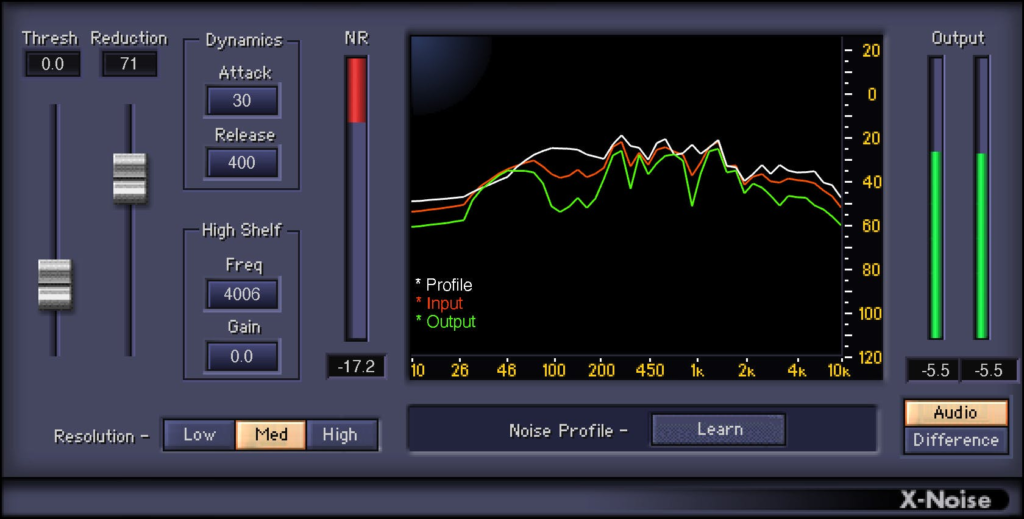
feature: Simplify tweaking with familiar, dynamics processor-like controls
Focus the reduction amount with Threshold and Reduction controls
Smooth the reduction processing with Attack and Release controls
Save two noise profiles for easy comparisons
“Difference” mode monitors only noise—try this for sound design
Works with individual tracks, or complete mixes
Obtain visual feedback from frequency-based spectral display
Add a high-frequency boost or cut with a high-shelf filter
Optimize resolution for frequency or time-domain processing
When you can’t isolate the noise, choose from 13 factory presets
licensing methods:
computer
usb
platforms: mac
windows
1178-3023