Smart Vocal & Dialogue Processing
VoiceAssist uses ARA analysis to generate automation for the routine work that usually slows down vocal and dialogue sessions. It is built to deal with the everyday issues you see across takes, comps and location sound, while keeping you in complete control of the result.
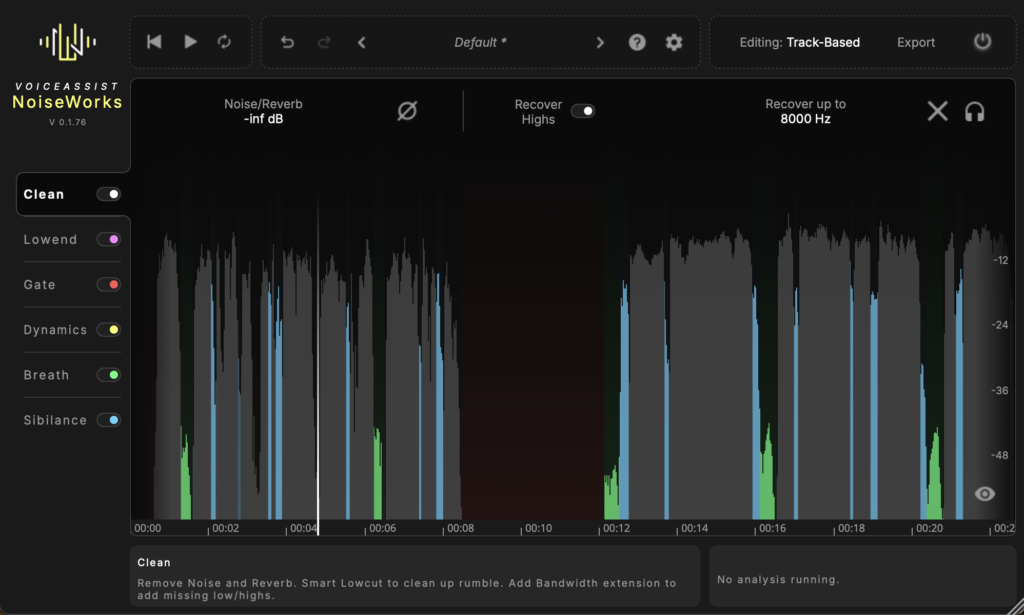
Clean
Tools for handling background build-up and room reflections, plus Recover Highs for restoring lost detail in takes that have softened through distance or earlier processing. Designed to give you a more workable starting point without introducing artefacts.
Dynamics
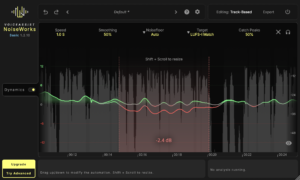
Analyses the performance and writes level automation that you can edit directly. Manual adjustments remain intact even when you alter settings. Includes LUFS I and LUFS S targets and a Catch Peaks control for quick transient spikes.
Gate
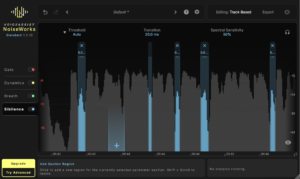
Adjustable boundaries help you manage noise floors across changing environments, comps, or mic positions.
Designed to keep things consistent in later stages — without aggressive gating or hard cuts. Content-aware processing automatically detects voice and silence, without relying on a threshold. If needed, you can switch to a traditional threshold-based approach.
Breaths And Sibilance
Automatic detection of breaths and sibilance helps reduce harshness in the performance.
Both get their own sections with editable boundaries, so the processing follows the material — rather than forcing it into a fixed curve.
The Sibilance section includes Spectral Sensitivity to address harshness within the sibilant itself, without flattening consonants.
Lowend
Helps stabilise the low end across sections, takes, and locations.
Adds weight where the recording feels thin and reins in excess energy where it has built up.
Resonant Reduction identifies narrow peaks and lets you control them — without having to hunt manually.
Lowcut Options
In addition to a fixed low-cut filter, VoiceAssist offers a pitch-based mode that adapts as the performance shifts.
Useful when a single high pass setting does not cover everything in the take.
Who Is VoiceAssist For
VoiceAssist is built for people who spend a good part of their week working on vocals or spoken word. It automates the essential but boring parts of the job so you can get on with being creative. It also saves hours of time, which matters when you are working to tight budgets and deadlines.
Music Production and Mixing
Array
(
[0] => Producers and vocal mixers who want less time tied up in noise control, breaths, sibilance and levelling.
[1] => Engineers dealing with stacks of takes, comps and layered vocals that need to behave before proper mix decisions can start.
[2] => Anyone building vocal chains who prefers focusing on tone and performance rather than repetitive corrective steps.
)
Post Production and Dialogue
Array
(
[0] => Dialogue editors managing material recorded across different rooms, shooting days and mic positions.
[1] => Re record mixers who want cleaner, more consistent stems before they reach the stage.
[2] => Podcast and broadcast editors preparing large volumes of speech with limited turnaround time.
)
Hybrid Workflows
Array
(
[0] => Facilities .where sessions move between DAWs or between editors and automation needs to stay intact
[1] => Anyone who wants predictable, editable results without relying on long chains of corrective plug ins.
)
Transfer Mode: VoiceAssist in Every DAW
Until now, VoiceAssist required ARA to work directly on your audio. That meant full support in Pro Tools, Logic, Studio One, Reaper, and other ARA-compatible hosts. But it also meant that engineers working in Ableton Live, Fl Studio or other DAWs without ARA couldn’t use VoiceAssist at all.
Transfer Mode changes that. It works by capturing your audio into VoiceAssist first. You play or record the signal through the plugin, VoiceAssist analyses it, and from there you have access to the full processing chain: Clean, Dynamics, Gate, Breaths, Sibilance, everything.
It’s a straightforward capture-process-transfer workflow, and it means VoiceAssist now works everywhere. If your DAW can load a plugin, you can use VoiceAssist. No ARA required.
For engineers who already work in ARA-supported DAWs, nothing changes. ARA remains the fastest and most integrated way to use VoiceAssist. Transfer Mode is there for everyone else, and for situations where ARA isn’t available or practical.
Spectral Editing
Spectral Editing lets you work in the time-frequency domain, targeting specific frequencies at precise moments in time. Select the problem area, reduce or remove it, and leave everything else untouched. It’s the kind of surgical work that previously required standalone restoration software and an additional round-trip. Now it’s built directly into VoiceAssist, alongside everything else.
This is especially useful in dialogue and post-production work, where recordings often come with issues that broadband tools can’t solve without compromising the voice itself. Even though the Clean AI model already handles many of these problems, spectral editing adds an extra layer of fine control when you need it.
requirements:
mac:
cpu: intel & M1/M2/M3 native support
ram: 16
version: min OS 12.0
internet required: no
plugins:
VST-3
AU
AAX
STAND-ALONE
windows:
cpu: Intel i5 or equivalent AMD processor
ram: 16
version: Windows 10
internet required: no
plugins:
VST-3
AAX
STAND-ALONE
trial: no
notes:
feature: Detailed level automation editable by the user
LUFS I and LUFS S
Catch Peaks for fast spikes
Editable boundaries and more natural shaping
Spectral Sensitivity for cleaner consonant detail
ARA and standalone operation
Automation & environment noise export
Full vocal and dialogue prep for music and post
Full vocal workflow plus dialogue support
ARA analysis that generates editable automation
Expanded noise and room handling plus Recover Highs
Dedicated Lowend section for support and control
Automatic identification and reduction of narrow peaks
Manual, pitch based and dynamic lowcut modes
Adjustable boundaries with the option to create new ones
Spectral Editing
Transfer Mode: VoiceAssist in Every DAW
platforms: mac
windows
1178-4261