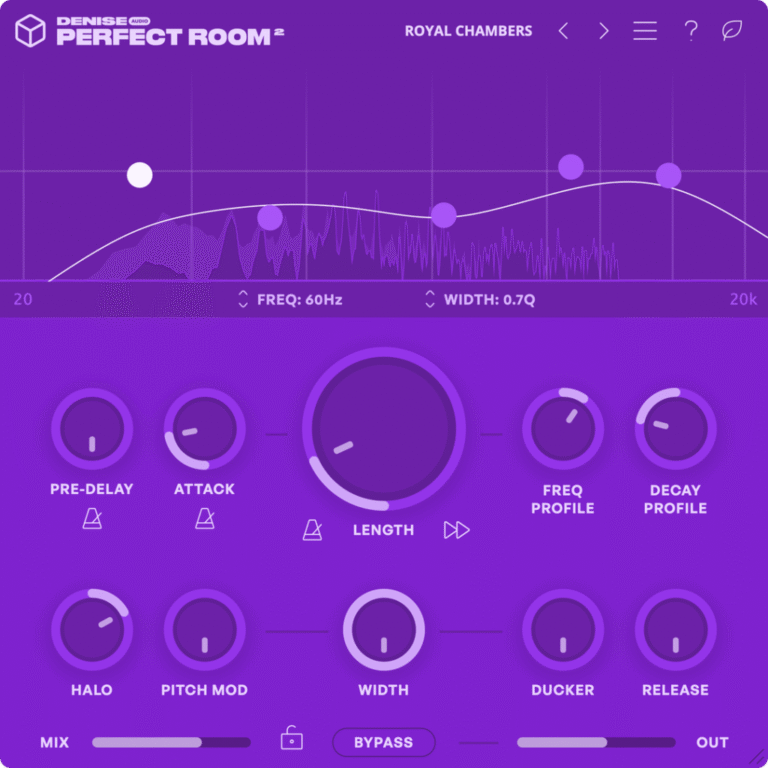
Perfect Room 2 creates pristine reverb with unprecedented clarity. With surgical controls and an uncommonly transparent sound, it’s the cleanest way to reach your vision of reverb perfection.
Perfect just got better
Perfect Room 2 is a new approach to reverb with a clean and transparent character.
A reinvention of our best selling plugin to date, Perfect Room 2 improves on the original with enhanced clarity, greater fidelity and zero latency performance.
Unlike conventional algorithmic or convolution reverbs, Perfect Room 2’s Dynamic Room Response technology ensures it never intrudes on your original sound.
That makes it ideal for sensitive tasks where transparency, detail and fidelity to the source are essential.
But physical reality is far from the limit with Perfect Room 2.
The sequel comes with expanded creative flexibility to let you dial in everything from invisible ambience to shifting sonic vistas that move with your track.
Clean your room
Dynamic Room Response technology
Array
(
[0] => Most reverbs bring their own sonic character to the party. Perfect Room 2 is different. Its Dynamic Room Response engine starts with a mathematically ideal acoustic simulation. That means no resonances, no harsh reflections and no awkward shifts in density. Just your sound, extended in time.
)
Roll your own room
Array
(
[0] => Perfect Room 2 is a blank canvas for your reverb masterpiece. Sculpt your ambience with simple, yet powerful controls and easily configure the perfect space to compliment your mix.
)
Mastering-grade reverb
Array
(
[0] => Perfect Room 2 delivers clarity and transparency in the most demanding production applications. Use it to build precision ambience for reference-grade performances, full mixes and even mastering without hesitation.
)
No delay lines, no IR files, no artifacts
Perfect Room 2 takes a new approach that differs from conventional reverb techniques.
Its Dynamic Room Response engine generates a simulated acoustic profile for you to shape in real time.
If you’re fed up with the unnatural sound of algorithmic reverb or the rigidness of IR-based convolution, Perfect Room 2 is a breath of fresh air.
There’s no need to toggle between models or scroll through dozens of IR files to find your sound.
Instead, Perfect Room 2 lets you interact directly with the internal room simulation to create infinite variations of clean ambience.
If you’ve ever wished for a reverb plugin that gives you back exactly what you put in, you’ll love working with Perfect Room 2.
Acoustical architecture
Attack, Decay and Reverse
Array
(
[0] => Perfect Room 2 can process up to 10 seconds of decay time, but it can also influence the onset of the room response with the attack control. Use it to create gently building density or delay-like non-linear reverb. Want to take it even further? Reverse the room profile and hear the decay backwards!
)
Flexible Stereo Width
Array
(
[0] => Perfect Room 2’s width control introduces mono-compatible variation between the left and right channels in the simulated room. Turn it up for lush stereo reverb or keep it low for beamy, directional ambience.
)
Frequency and Decay Profile
Array
(
[0] => Tailor your simulated room’s frequency and decay characteristics with two simple controls. Easily transition from dark, hollow reverbs to bright, scattering reflections with the turn of a dial.
)
Go beyond perfection
Extensive tempo sync
Array
(
[0] => Perfect Room 2’s time-based parameters can be synced to the host tempo for precise bar/beat divisions of pre-delay, attack and decay.
)
Ducker
Array
(
[0] => Engage a compressor on the reverb tail with the dry signal feeding its sidechain input. Use it to retain clarity so the wet signal never overwhelms the dry.
)
Pitch Mod
Array
(
[0] => Introduce mono-compatible modulation on the reverb tail for a lush, enveloping ambience, that never causes phase issues.
)
Halo
Array
(
)
The cleanest reverb ever
When your sounds are spot-on, you need reverb that doesn’t get in their way.
Perfect Room 2 is a new paradigm in studio reverb that excels where conventional approaches fall short.
But it’s much more than just a problem solver. Perfect Room 2 lets you use reverb in situations you might not have considered before.
Full mixes, critical acoustic recordings and even mastering workflows can benefit from its controlled, transparent sound.
Not only that, it offers novel sound design possibilities like non-linear decay profiles that put old-school gated reverb to shame.
No matter which other reverbs you’re used to, Perfect Room 2 brings a unique set of capabilities for your production toolbox.
What’s New in V2
Array
(
[0] => Zero latency processing
[1] => Core engine and sound quality improvements
[2] => Improved CPU performance and a new ECO mode for even lower usage (at the expense of latency)
[3] => Reverb engine updates in realtime with parameter changes
[4] => Major GUI overhaul for easier workflow
[5] => 5 band EQ for detailed frequency shaping
[6] => Tempo sync for length, pre-delay and attack
[7] => New attack parameter to control reverb onset
[8] => Continuous decay and frequency profile (was stepped in v1)
[9] => New Halo feature
[10] => Improved pitch modulation with perfectly random variations for a more organic response
[11] => Preset lock
)
requirements:
mac:
cpu: Apple Silicon Support
version: macOS 10.11 or newer
internet required: no
support:
64_bit
plugins:
VST-2
VST-3
AU
AAX
windows:
version: Windows 10 or newer
internet required: no
support:
64_bit
plugins:
VST-2
VST-3
AAX
trial: no
notes:
feature: Tooltips: Toggle the tooltips on/off.
ECO Mode: Enable for reduced CPU usage. Introduces some latency.
Pre-delay: Add a delay before the reverb tail begins.
Pre-delay sync: Sync the pre-delay time to the host tempo.
Attack: Soften the initial phase of the simulated room response for a more gradual onset of the reverb.
Attack Sync: Sync the attack time to host tempo
Length: Adjust the length of the reverb tail
Length Sync: Sync the reverb length to the host tempo.
Freq Profile: Adjust the frequency content of the simulated room response. Positive values emphasize the upper mids and highs. Negative values tilt the room color darker.
Halo: Isolate the high or low frequencies and extend their decay beyond the set length for a lingering spectral effect. Positive values affect high frequencies, negative values affect low frequencies.
Pitch Mod: Introduce pitch modulation for lush, chorusing reverb tails.
Width: Adjust the difference between the left and right channels of the simulated room response. Mono at 0%.
Reverse: Reverse the simulated room profile.
Ducker: Set the amount of compression applied to the wet signal.
Ducker Release: Set the release time of the ducking compressor.
Mix: Blend the dry signal with the reverb effect.
Bypass: Bypass the plugin
Output: Set Perfect Room 2’s global output volume.
Wet Lock: Lock the wet/dry mix value while changing presets.
Decay Profile: Adjust the decay shape of the simulated room response. Positive values create a late drop-off decay point, negative values create an early drop-off decay point.
platforms: mac
windows
1178-4153