
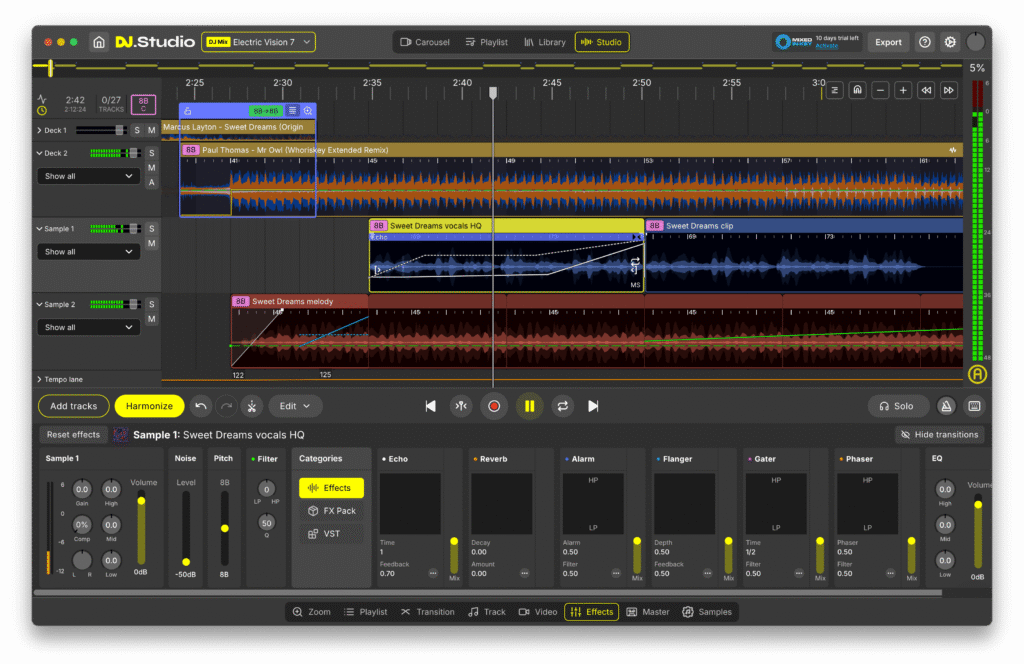
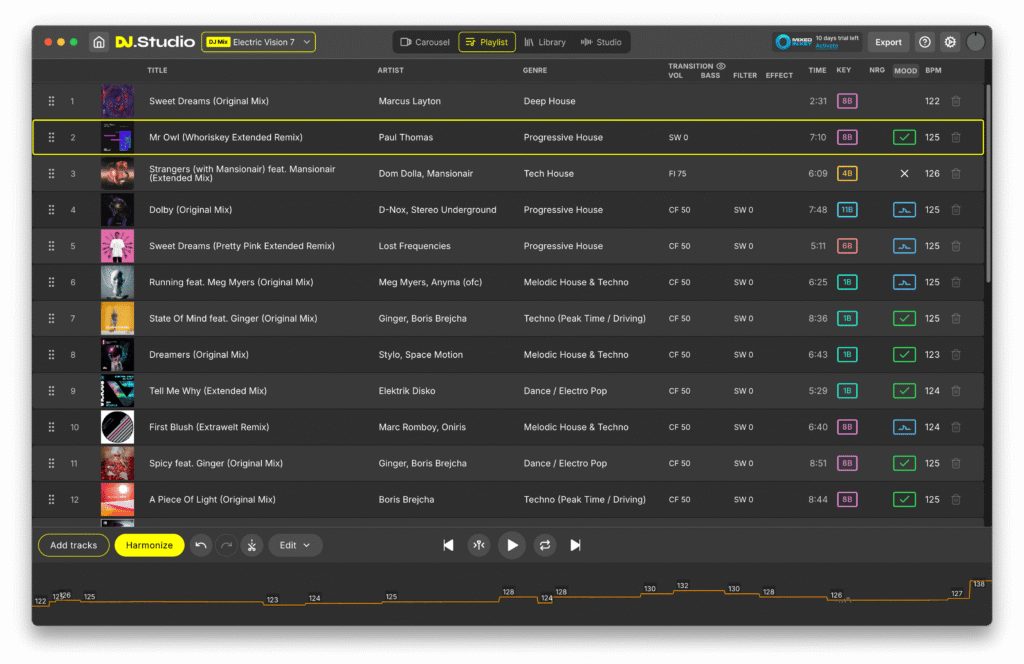
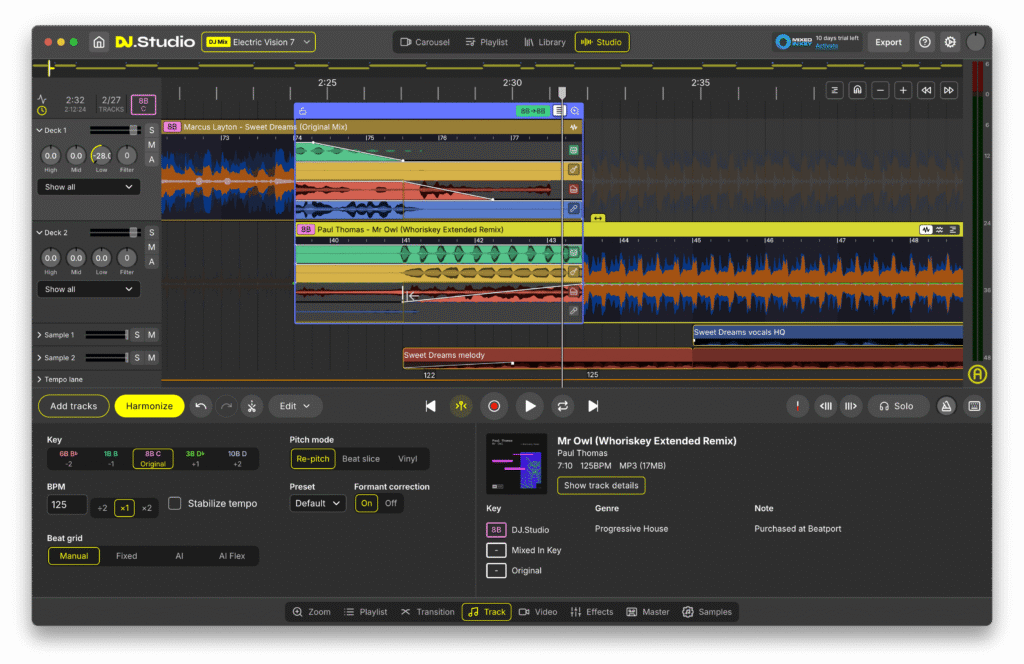
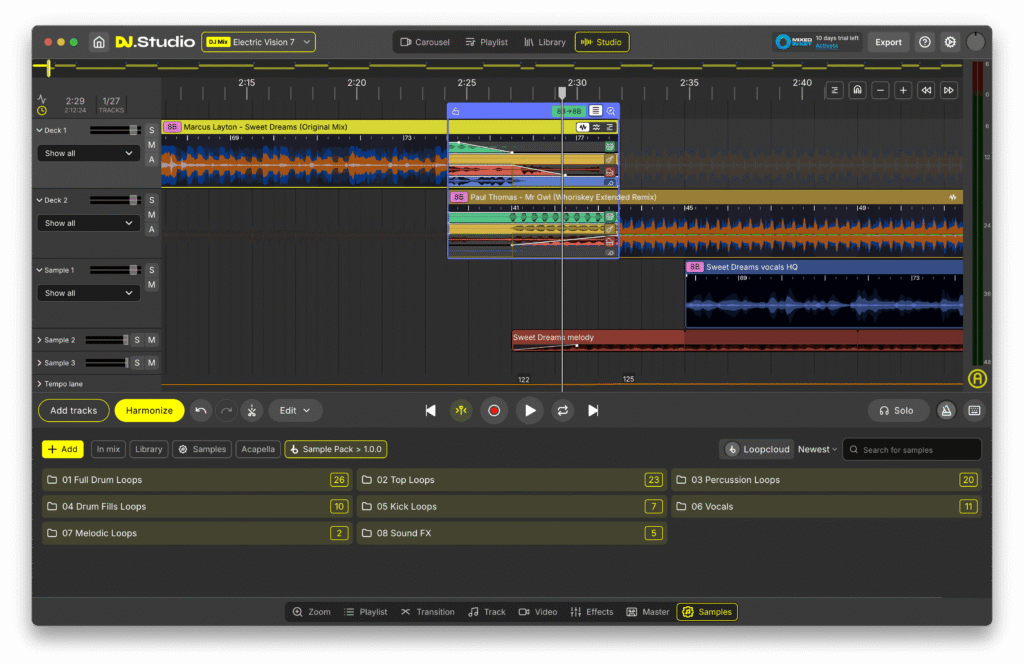
Prepare DJ sets, create radio shows, and make DJ mixes and mashups with unparalleled speed and accuracy – all from your laptop, with no hardware required.
Effortlessly craft precise, seamless transitions using our unique timeline-based suite of DJ tools, now faster and more powerful than ever. DJ.Studio Pro + Stems 4.0 adds enhanced stem separation, more precise editing tools, and improved workflow, giving you the creative control to produce mashups and remixes at a professional level.
Whether you’re a bedroom DJ or a headliner on the biggest stages, DJ.Studio provides the features you need to maximize creativity and productivity. Version 4.0 introduces faster stem processing, improved stem models, and color-coded waveforms to make mixing, editing, and mashup creation faster and more intuitive.
Until now, producing finished DJ mixes required a DJ controller and live mixing, meaning a one-hour mix took one hour of recording time – assuming no mistakes. Alternatively, you could use a music production DAW, but these have a steep learning curve and are designed for producing music, not for DJ mixing.
This is where DJ.Studio Pro + Stems Edition 4.0 comes in – a DAW for DJs, bridging the gap between traditional DJ mixing and desktop-based studio software. From music discovery, to mix editing and flexible exporting, DJ.Studio provides all the tools you need to make full, professional-sounding DJ mixes from start to finish…
Super fast DJ Mixing and Mashing with zero live fails
Create Your Playlist
Array
(
[0] => Import music from local libraries including iTunes, rekordbox, Serato, VirtualDJ, Mixed In Key, Engine DJ, Traktor, or browse local files (MP3, WAV, AIFF, FLAC, and more).
[1] => Integrated Beatport & Beatsource support allows previewing tracks before purchase, directly within Studio 4.0.
)
AI-Powered Playlist Ordering Assistant
Array
(
[0] => Harmonize your playlist using millions of calculations to perfectly order tracks by tempo and key.
[1] => Automix ensures musically cohesive transitions, avoiding awkward clashing keys.
[2] => Beat-sync tracks automatically for a flawless DJ mix with a consistent groove.
)
Refine Your Transitions
Array
(
[0] => Studio timeline editor improvements provide better visibility for cuts, duplicates, and transitions.
[1] => Default and custom transition presets, with curves for volume, EQ, and effects.
[2] => Enhanced drag-and-drop volume fade controls using new white-square handles.
)
Manual Automation Editor
Array
(
[0] => Control any parameter through the flexible timeline system.
[1] => Stack effects, EQ, volume, and other automation controls simultaneously.
)
Edit Your Tracks
Array
(
[0] => Cut, duplicate, or move sections to create unique, customized mixes.
[1] => Redesigned beat grid editor allows precise individual beat adjustments, stabilizing tempo, and overall grid control.
)
Enhanced Stem Separation
Array
(
[0] => 4 new stem models provide higher-quality separation of vocals and instruments.
[1] => Faster stem processing: Windows 3x–10x faster, Mac M1 75% faster.
[2] => Stems now cover entire tracks, with volume automation lines per stem.
[3] => Stems are color-coded in waveforms for clarity.
[4] => Fully compatible with Vinyl mode for scratch and deck control.
)
Make Mashups and Remixes
Array
(
[0] => Slice and isolate drums, bass, melody, and vocals for mashups or extended edits.
[1] => High-quality vocal isolation for backing tracks or independent project use.
[2] => Improved Mashup mode: better track dragging, beat grid snapping, and workflow speed.
)
Extra Sample Lanes
Array
(
[0] => Add custom samples and sound effects for personalized mixes.
[1] => Loopcloud integration remains, including the free sample pack and 60-day trial.
)
Share Your DJ Mixes With The World!
Array
(
[0] => Export mixes as MP3 or WAV files directly to your hard drive.
[1] => Export playlists as M3U files for live performances.
[2] => Rekordbox export includes track edits.
[3] => Serato export supports hot cues and track edits.
[4] => Ableton export included for advanced post-processing.
)
Beat Detection
Array
(
[0] => AI-powered beatgrid detection ensures precise alignment even for swing, groove, or complex breakbeats.
[1] => Improved 4.0 beat grid editor provides enhanced visibility, stabilization, and tempo correction.
)
Studio View
Array
(
[0] => Change BPM
[1] => Edit your transitions
[2] => Default and custom transition presets
[3] => Apply manual automations
[4] => Add your own samples
[5] => Stem-separated transitions and volume automation per stem
[6] => Make mashups and re-edits with stem separation
[7] => Split acapella and instrumental parts from tracks
[8] => Export: MP3 and WAV files, DJ Set (M3U), Mixcloud, Ableton live
[9] => Re-pitch audio
)
Supported Libraries
Array
(
[0] => Local file downloads
[1] => rekordbox, Mixed In Key, Serato, Engine DJ, Virtual DJ, Apple Music, Traktor Pro, iTunes
)
requirements:
mac:
cpu: Core processor Intel newer than 2017 or Silicon
ram: 16
disk: 4
version: Big Sur 11 or higher
internet required: no
windows:
cpu: Core processor Intel or AMD newer than 2017
ram: 16
disk: 4
version: Windows 10 or higher
internet required: no
trial: no
notes:
feature: Automix
Drag and drop tracks
Supported file types for import: WAV/AIFF/AIF/M4A/FLAC
Work offline
Intuitive mix editor
platforms: mac
windows
1178-3184


